
Read the rest of this post »
Diposting oleh fawaid on Rabu, 25 April 2012

Diposting oleh fawaid on Selasa, 10 April 2012

You get an awesome iPad case, that's what. Japanese company Rakuten created this iPad case to resemble a MacBook. The case syncs with your iPad over Bluetooth, and has keyboard controls for things like brightness and volume, as well as a battery for extending the already amazing battery life on the iPad. If I was to get an iPad case, this would be it. You can check it out here... And here's the Google translation for the page. The case is ¥5980, or about $74.

Via CultOfMac
Diposting oleh fawaid on Senin, 02 April 2012

The new iPad has been immensely popular, with launch weekend sales over 3 million units. And, as it turns out, a record 98% of new iPad users are satisfied with the new iPad. A study by ChangeWave surveyed 200 new iPad users. Of those surveyed, 82% said they were "very satisfied" with the new iPad, while 16% said they were "somewhat satisfied". Only 2% of users said they were "somewhat unsatisfied" and no one said they were completely unsatisfied with the Apple's latest tablet. Not a single person has been completely unsatisfied with the device. Personally, my response would have been thrown into the "very satisfied" category, but only after they translated my response of "I f*%#^!% love this thing".
All those "issues" with heat or wifi? Looks like they weren't really issues at all. What a surprise.
via MacObserver
Diposting oleh fawaid on Rabu, 28 Maret 2012

There was a bit of a commotion recently after a researcher discovered that the new iPad continues to draw power as though it's charging, even after reporting a full battery. Immediately, the assumption was made that the iPad was still charging, and lying about being at full capacity. Apple has responded to this, to clear things up for people. Apparently, the iPad, like all iOS devices goes though a phase of charging after reaching 100%. Basically, after reaching 100%, it will go though a conditioning cycle. The battery will discharge slightly, and then recharge. This is similar to the charging advice given for laptop batteries, and is good for a long lasting battery. This amount is so small that the iOS device still reports 100%. Once the conditioning cycle has finished, it goes back to the normal trickle charge cycle, which keeps the device at 100% using minimal power.
Read the rest of this post »
Diposting oleh fawaid on Selasa, 27 Maret 2012

Well, yeah, the iPad is "cooler" than the competition. But I'm not referring to whether or not Fonzie would have used one, I'm referring to heat. Consumer reports said that the iPad got up to 116 degrees after playing Infinity Blade 2 for 45 minutes. Wired did the same test, but found the iPad got up to 108 degrees. That might sound hot, but it's really not that bad. After speaking with a doctor, Wired was told that even prolonged use of something that was 116 degrees wouldn't be harmful. The bottom casing of your laptop most likely gets much hotter. But, unlike Consumer Reports (and their awful reporting), Wired took the test a step further, and put some perspective on those temperature readings. They did this by testing other tablets, something Consumer Reports neglected to do.
They had to find a game that was available on all the tablets they tested. While the graphics would be different on each device, they would still push that particular device to its limits. So, they settled on Dead Space, which looks pretty good on all platforms, even the lowly Kindle Fire. What they found was that ALL the tablets heated up when playing a game for 45 minutes (no duh), and that the iPad was actually in the middle, not the hottest, but not the coldest either. The Asus Transformer Prime actually got the hottest, although even there, the difference over the iPad was just 4.5 degrees. In fact, the difference between the coldest and hottest was just 8.5 degrees. They also found the new iPad was only half a degree warmer than the iPad 2. All of the tablets scored below 98.6 degrees, or your average body heat although the Transformer Prime by just .1 degrees). Unless you're a zombie, in which case these tablets may feel quite warm.
I'm hoping this is the last we hear of this whole "heat issue".
Diposting oleh fawaid on Senin, 26 Maret 2012

Apparently, the new iPad isn't just the best tablet on the market, it's also the best LTE hotspot. The iPad can function as an LTE hotspot for 25.3 hours straight, sharing a WiFi connection using the LTE network. Compare that to the LTE hotspot from Samsung, which can only last 216 minutes, or a little over three and a half hours. However, the Samsung hotspot is just $49 with contract, and the base model LTE iPad is $629. Of course, it goes wiout saying that you get a lot more than a hotspot with the iPad. In fact, unless you're sharing your hotspot with other people, it's hard to believe that anyone would use their iPad as a hotspot instead of using the LTE network for their iPad. Still, it's good to know that in a pinch, the iPad makes an amazing LTE hotspot, outlasting even devices specifically made for the function.
via iMore
Diposting oleh fawaid on Minggu, 25 Maret 2012

When I got my iPad, one game made me start using a stylus: draw something. My ability to draw isn't what anyone would call "great", so using a stylus improved upon my lousy finger paintings. Unfortunately though, I started to find out that there were a number of issues with the stylus I was using, the Ten One Pogo stylus. At first, it was just the fact that it was a bit too short, but after using it for a few days, the tip began to fall apart. After a while, it became hard or impossible to get my iPad to recognize it. I never really used it before, but now that I was drawing more, I found it to be lacking in quality and usability. So, I decided it was time to get a new stylus. I wanted one that would be durable, accurate, and comfortable to use, and I think I found that with the Wacom Bamboo Stylus.
Read the rest of this post »
Diposting oleh fawaid on Kamis, 22 Maret 2012

Some users of the iPad 2 who upgraded to the new iPad thought they wouldn't have to buy a new Smart Cover for their new iPad. Unfortunately, some people weren't correct in their assumption. The Smart Cover uses magnets to work (no, I won't explain how magnets work). When the iPad senses the magnets in the Smart Cover, it automatically locks, and unlocks when the Smart Cover is pulled away. However, the new iPads are a bit different. It won't switch on or off for just any magnet, only the ones with the right polarity. This is to make it less likely to just shut off if a magnet is placed near the sensor. The iPad 2 and the old Smart Covers weren't made with a specific polarity, which means it could go either way. So, if you have an old Smart Cover, you may or may not need to get a new one when you buy the new iPad. Still, you'll probably want to save some money and avoid buying a new Smart Cover until you check to see if your old one works.
Diposting oleh fawaid on Rabu, 21 Maret 2012
 Another potential iPad issue being blown out of proportion. Some people have posted on the Apple discussion forums claiming that their iPad gets bad or slow WiFi reception. So far, less than 100 people have voiced a complaint, and it seems an overwhelming majority have not experienced any issue. 100 out of 3 million? I'd take those chances.
Diposting oleh fawaid on Selasa, 20 Maret 2012

I've tried blogging from my iPhone before, but had trouble finding a really good app for it. I tried Blogpress, Blogger's official app, and tried using the blogspot (blogger) website itself, none of them were all that good. They'd either be missing features, have a lousy interface, few options, or terrible photo uploading options. So, after writing a few posts with those apps, I starting looking for something else. Fortunately, I found Blogsy.
Read the rest of this post »
Diposting oleh fawaid on Senin, 19 Maret 2012

Diposting oleh fawaid
iPad, the most desired and fashionable tablet computer, was developed and introduced by Apple Inc and the latest version of this device has been released on 7th March 2012. Being a SIM free and 3G device it has become the top choice of people of all class especially of the young generation. Though it was first thought to be an audio visual device but now it has become a complete package.
This device is in between the traditional laptop and Smartphone in size but not in power as it is powered by Apple iOS. So going with a SIM free iPad 3G is considering the best way to go. As you can use it with SIM only contract, it also reduces your cost to some extent. If you are a non UK reader then first consider reading the next paragraph to be clear about what a SIM only contract is.
A SIM only contract is like an ordinary deal or agreement between the network service provider and the user / subscriber. Here you (user) will be provided only a SIM card but no mobile phone. So you can either use it with your existing mobile phone or can buy a new mobile phone separately. Under this contract you will pay to the service provider only for the SIM service. As this deal only covers the SIM service it is called SIM only contract or deal.

Hope you have got a primary idea about SIM only contract, now take a look at the reasons why going with SIM free iPad 3G is considered the best way to go.
Today 3G network is available almost in everywhere. So if you have an iPad 3G you can easily get connected with 3G network and can enjoy the 3G services without much difficulties. Being a SIM free iPad 3G allows all to take it to anywhere in the world which gives you flexibility of using it.
SIM only contract gives a bit freedom and flexibility of using desired network. So if you buy an iPad on contract it will cost you a bit more than if you buy it as SIM free. Because if your iPad is SIM free then you can choose any affordable deal or tariff plan which will reduce your cost effectively whereas confining yourself in a deal regarding your iPad will cost you more.
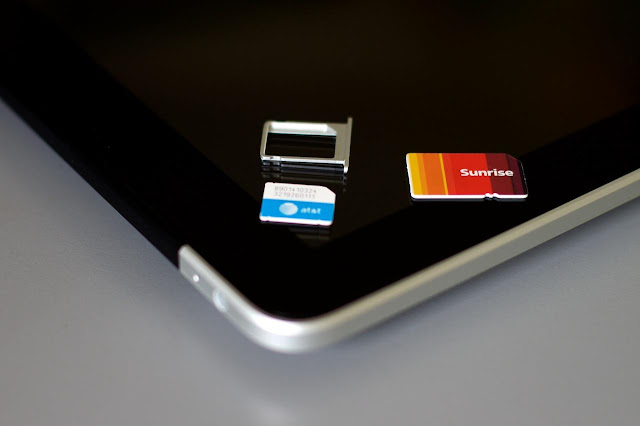
There are people who have to travel a lot all around the world through out the year for their profession or just for fun. SIM free iPad 3G is the best solution for these people. SIM free facility allows them to insert any SIM card of any network from any country in the world. So they don’t need to buy a new handset whenever they go abroad. They just need to buy a new SIM card of that specific area to use their lovely SIM free iPad 3G.
GPS stands for Global Positioning System with which Smartphones and 3G devices like iPad can easily track the way, search in the map and can provide services like finding hotels and specific areas. As SIM free iPad 3G allows you to carry it with you all over the world, you can also enjoy the GPS services easily which is mostly needed when you are in an unknown place.
These were some key advantages which make all to go for a SIM free iPad 3G. So, it’s your tern and the decision is also yours whether to go with it or not.
Costea is working for a website that offers some of the best iPad SIM Only Contracts. He often writes about the latest gadget news.
Diposting oleh fawaid on Rabu, 14 Maret 2012

Diposting oleh fawaid on Selasa, 13 Maret 2012
.jpg)
Diposting oleh fawaid on Sabtu, 10 Maret 2012

Diposting oleh fawaid
Diposting oleh fawaid on Jumat, 09 Maret 2012

Diposting oleh fawaid

Diposting oleh fawaid on Kamis, 08 Maret 2012

Diposting oleh fawaid on Rabu, 07 Maret 2012
